Sunday, November 17, 2013

How to get current page URL in Codeigniter?

For getting complete URL:

By using the current_url() method we can get the current page URl of the page.

Example:

$page_url=current_url();
echo $page_url;

For getting URI segments:

By using the following statement we can get the segments in the URI.

Syntax:

$this->uri->segment(n);
           where n=1 for controller
                     n=2 for method
                     n=3,4,5,6........ for parameters.
 
Example:

URL:   http://localhost/nareshphp/login/home

echo $this->uri->segment(1); //It will returns login as output

echo $this->uri->segment(2); //It will returns home as output


For getting current controller and method names:

$this->router->fetch_class(); //It will returns controller name

$this->router->fetch_method(); //It will return current method name.


Keep Smiling....

Tuesday, August 20, 2013

What is Mail Cron?

Mail Cron:
Mail Cron is a UNIX command used for sending mails to customers at time intervals through SMTP's.
Cron Syntax:
/usr/bin/GET  http://your site or mail sending area complete path
Example:
/usr/bin/GET  http://www.naresh-php.com/index.php/mail/send_mails/mails_list

Keep Smileing...

Monday, August 12, 2013

How to display clock using Javascript in PHP?

The following snippet of code display current time in your web page.

JavaScript
 <script  type="text/javascript" >
   function updateClock () {
    var currentTime = new Date();
    var month = currentTime.getMonth();
    var date = currentTime.getDate();
    var year = currentTime.getFullYear();
    var currentHours = currentTime.getHours ();
    var currentMinutes = currentTime.getMinutes ();
    var currentSeconds = currentTime.getSeconds ();
   
    var months = new Array(
    "January", "February", "March", "April",
    "May", "June", "July", "August", "September",
    "October", "November", "December");
   
    // Pad the minutes and seconds with leading zeros, if required
    currentMinutes = ( currentMinutes < 10 ? "0" : "" ) + currentMinutes;
    currentSeconds = ( currentSeconds < 10 ? "0" : "" ) + currentSeconds;
   
    var currentTimeString = months[month]+" "+ date +", "+year+" "+currentHours + ":" + currentMinutes + ":" + currentSeconds;
   
    document.getElementById("clock").firstChild.nodeValue = currentTimeString;
}
</script>

HTML Code
<body onload="updateClock(); setInterval('updateClock()', 1000 )">
<div id="clock" align="center" style="color:#F30; font-weight:100;">&nbsp;</div>
</body>


Have a nice day....

Simple captcha using jQuery in PHP?


PHP Code

$length = 6;
$captcha = substr(str_shuffle("0123456789abcdefghijklmnopqrstuvwxyzABCDEFGHIJKLMNOPQRSTUVWXYZ"), 0, $length);


HTML Code

<input type="text" name="captcha" value="<?php echo $captcha; ?>"  id="captcha" />

Enter the code above here :

<input type="password" name="Enter Code" />

Can't read the image? click <a href='javascript: refreshCaptcha();'>here</a> to refresh</td>


JS Code

<script>
function refreshCaptcha()
{
 var text = '';
    var possible = 'ABCDEFGHIJKLMNOPQRSTUVWXYZabcdefghijklmnopqrstuvwxyz0123456789';

    for(var i=0; i < 6; i++)
    {
        text += possible.charAt(Math.floor(Math.random() * possible.length));
    }
    $("#captcha").change().val(text);
}
</script>


Keep Smileing...

Friday, June 28, 2013

How to add menu to footere in wordpress?

The following single line code add in footer where you want to show menu bar.


Syantax:

<?php wp_nav_menu(array('menu' => 'name')); ?>
                          where name = Menu slug name.

Example:

<?php wp_nav_menu(array('menu' => 'my-custom-menu')); ?>

Wednesday, June 26, 2013

How to change Woocommerce products per page?

By adding the following one line code to your functions.php file, we will change the products per page in Woocommerce.
Now i would like to display 12 products in the place of regular 10 products.


add_filter('loop_shop_per_page',create_function('$cols','return 12;'),20);

Friday, June 21, 2013

Show cart contents / total at WooCommerce header in Wordpress?

Add the following bit of code to your header file exactly where you want to display the cart total items value.

<?php global $woocommerce; ?>
<a class="cart-contents" href="<?php echo $woocommerce->cart->get_cart_url(); ?>" title="<?php _e('View your shopping cart', 'woothemes'); ?>"><?php echo sprintf(_n('%d item', '%d items', $woocommerce->cart->cart_contents_count, 'woothemes'), $woocommerce->cart->cart_contents_count);?> - <?php echo $woocommerce->cart->get_cart_total(); ?>
</a>

<!---Ensure cart contents update when products are added to the cart via AJAX (place the following in functions.php)---->

<?php
add_filter('add_to_cart_fragments', 'woocommerce_header_add_to_cart_fragment');
function woocommerce_header_add_to_cart_fragment( $fragments ) {
global $woocommerce;
ob_start();
?>

<a class="cart-contents" href="<?php echo $woocommerce->cart->get_cart_url(); ?>" title="<?php _e('View your shopping cart', 'woothemes'); ?>"><?php echo sprintf(_n('%d item', '%d items', $woocommerce->cart->cart_contents_count, 'woothemes'), $woocommerce->cart->cart_contents_count);?> - <?php echo $woocommerce->cart->get_cart_total(); ?>
</a>

<?php
$fragments['a.cart-contents'] = ob_get_clean();
return $fragments;
}
?>

Keep Smiling.
Naresh.

Thursday, June 20, 2013

How to add WooCommerce short codes in Wordpress Template files?

By using do_shortcode() function we can add the WooCommerce shortcode 
to the template files.
Syntax:
<?php echo do_shortcode( 'ShortCode' ); ?>
Example:
<?php echo do_shortcode( '[fblike]' ); ?>


Keep Smiling

Naresh.

How to display welcome note in Wordpress along with user name?

The following piece of code full fill your requirement.

<?php
global $current_user;
get_currentuserinfo();
if(isset($current_user->user_login))
{
    $name=$current_user->user_login;
    echo 'Welcome '.ucfirst($name);
}
else
{

}
?>

......................
Keep Smilimg.

Thursday, May 2, 2013

How to create dynamic select boxes in Codeigniter form using AJAX?

The follownig code clearly explains you how to dynamic select boxes usin AJAX in codeigniter.

VIEW:

<div class="slidtxt">Category :</div>
<div class="slidfield">
<select name="category" id="sc_get">
<option value="ap">Andhrapradesh</option>
<option value="tn">Tamilnadu</option>
<option value="kr">Karnataka</option>
<option value="kl">Kerala</option>
</select>
</div>

<div class="slidtxt">Sub Category :</div>
<div class="slidfield">
<select name="subcat" id="sc_show">

</select>
</div>

<script>
//Script for getting the dynamic values from database using jQuery and AJAX
$(document).ready(function() {
    $('#sc_get').change(function() {

var form_data = {
name: $('#sc_get').val()
};

$.ajax({
url: "<?php echo site_url('controller_name/method'); ?>",
type: 'POST',
dataType: 'json',
data: form_data,
success: function(msg) {
var sc='';
$.each(msg, function(key, val) {
sc+='<option value="'+val.sub_cat+'">'+val.sub_cat+'</option>';
});
$("#sc_show option").remove();
$("#sc_show").append(sc);
}
});
});
});
</script>


CONTROLLER:

public function get_subcat()
{
        $cat=$this->input->post('name');
        $table='subcat';
        $where=array('cat' => $cat);
        $data['sc_get']=$this->admin->get_where_data($table,$where);
        $sc=json_encode($data['sc_get']);
        echo $sc;
}


MODEL:

public function get_where_data($table,$where)
{
        $query=$this->db->get_where($table,$where);
        return $query->result_array();
}


...........................
Have a Great Day.
Keep Smiling....


Friday, April 5, 2013

How to raplace one page to another address ?

 By using the following Javascript we can redirect from current page to another address.
<script>
window.onbeforeunload = function () {
   location.replace('http://www.google.com');
   return "This session is expired and the history altered.";
}
</script>
Note: Placed in header is preferable one. 

Tuesday, April 2, 2013

In PHP, how to search a value existed or not in array?

By using in_array function we can knows the element existed or not in that array.

Syntax:

         in_array('search_array_value',$search_array);

Example:

$fruits=array('Apple','Bananna','grapes','Mango');  

In the above array fruits we want to know the array having 'Bananna' value or not!

 if (in_array('Bananna',$fruits))
        {
                   echo 'Fruits having Bananna';
        }
        else
        {
                  echo 'Fruits doesn't having Bananna';
        }

Monday, April 1, 2013

How to add confirmation box to forms using Javascript?

No need to worry, it's a simple task. By adding "onclick" function to submit buttons.
syntax:  
onclick="return confirm('Do you like to proceed?');"
Example: 
<input type="submit" name="submit" value="Submit" onclick="return confirm('Do you like to proceed?');">

Monday, December 3, 2012

How to create login and logout buttons with sessions?

The piece of code simply create login and logout buttons with sessions in PHP.
<?php
$log=$this->session->userdata("email");
    
if(!$log)
{
       echo anchor('Login path', 'Login', 'title="login"');
}
else
{
         echo anchor('Logout path', 'Logout', 'title="logout"');
}
?>

How to create pagenation in Codeigniter?

 The follownig code clearly explains you how to cretae page nation in codeigniter.

Controller:
 Step1: declare two parameters to the function, where pagenation is required.
             public function function_name($start=1,$page='pagename')
 Step2: Pass the session variables to the view.
           $val['login']=$this->session->userdata('logged_in');
           $val['admin']=$this->session->userdata('user');
Step3: Intialize and check the start value.
             if(!is_numeric($start))
            {
                 $page = $start;
                 $start = 0;
             }
             else if($start == 1)
            {
                 $start = 0;
             }
Step4: Load the header
           $this->load->view('path to header');
Step5: Load the pagination library.
           $this->load->library('pagination'); 
Step6: Configured the pagination.
            $val["start"] = $start;
            $val["page_key"] = $page;
            $limit=20;
           $val['entry'] =$this->model->get($table,$limit,'sno',$start);
           $val["menu_tag"] = "function_name/1";
           $config['base_url'] = 'path';
            $config['total_rows'] = $this->model->total_rows($table);
           $config['per_page'] = 20;
          $this->pagination->initialize($config);
          $val["pagination"] = $this->pagination->create_links();
Step7: Load the view   
            $this->load->view('admin/pages/contact_info',$val);
Step8: we need to crete one more function in our controller for call current page
            public function page($currentpage)
           {
                  echo $currentpage;
                  echo $this->pagination->create_links();
             }
View:
Step9: The following two lines code added to your view where you want to put pagination.
              <?php $pagination = str_replace('">',"/$page_key\">",$pagination);?>
              <?php echo $pagination; ?>
Model:
Step10. write the following functions in database for fetch the data from database.
            function total_rows($table)
           {
               $query=$this->db->get($table);
               return  $query->num_rows();
            }
           function get($table,$limit,$order_by = "sno",$start = 0)
           {
              $query = $this->db->order_by($order_by, "asc");
               $query = $this->db->limit($limit);
                $query = $this->db->get($table);
                 return $query->result_array();
            }

 This is all about pagination.
Keep smiling......


How to give authenication to controllers in codeigniter?

Simply add the following bit code to constructor of your controller, which is needed authenication. 

CODE:

$session_id = $this->session->userdata('logged_in');
$this->session->userdata('email');
if($session_id == FALSE) {
redirect('Login Path');

How to cretae captcha in php code?

The following piece of PHP code simply create captcha.

 <?php
$chars = "0123456789ABCDEFGHIJKLMNOPQRSTUVWXYZabcdefghijklmnopqrstuvwxyz";
$res = "";
for ($i = 0; $i < 7; $i++)
{
       $res .= $chars[mt_rand(0, strlen($chars)-1)];
}
echo  $res;
?>


Try this code and taste the PHP.

create facebook share to custom webpages?


There are mailly two steps to create share button in our site. They are
http://www.facebook.com/sharer.php?u=<url to share>
&t=<title of content>link or image</a>
  1. url to share – the site that you want to share to Facebook
  2. title of content – the name of what you are sharing
If I wanted to share my Facebook fan page with a custom image, I would use the following code.
<a href="http://www.facebook.com/sharer.php?u=http://facebook.com/
Anti.Social.Development&t=(Anti) Social Development" target="_blank">
<img src="http://www.kimwoodbridge.com/asdface.jpg" /></a>

You also check the following url:
http://www.kimwoodbridge.com/how-to-create-your-one-facebook-share-url/

Monday, July 23, 2012

How to create custom layout in your theme?

How to create simple Gallery in Drupal 6?

This tutorial was written with the following versions of Drupal and modules:

Update: Modules have been updated to the latest versions as of 20 April 2009, version numbers are in brackets after the links above.
Installation
Install Drupal as you normally would and extract each of the modules to the /sites/all/modules directory. You should have a directory structure like the following:
directory_structure
When logged in go to /admin/build/modules and enable the following modules:
  • Content
  • Filefield
  • Imagefield
  • ImageAPI
  • ImageAPI GD2 (unless your server is configured for Imagemagick, then enable the ImageMagick module instead)
  • ImageCache
  • ImageCache UI
  • Lightbox
  • Views
  • Views UI
Once you have ticked the modules, press Save configuration.
Imagecache
We need to create 2 presets for our images, one will be a thumbnail to show in the gallery and a second to show within the lightbox.
Navigate to /admin/build/imagecache and click Add new preset.
Set the preset Namespace to thumbnail. Click Add Scale and Crop, set the width to 180 and the height to 120.
Then create a new imagecache preset with the name lightbox. This time select Add Scale and set the width to 800 and the height to 600.
CCK Imagefield
First we will set up a new content type for our images which we will call Image. Navigate to /admin/content/types and click Add content type.
Set the name to Image and the type to image.  You may enter a description if you wish.
Under Submission form settings, delete the text from the Body field.
Depending on how you want to set up the gallery, you can change the Workflow settings so that images aren’t automatically added but are added to an approval list, for this tutorial we will make all images published, so untick Promoted to frontpage and leave Published ticked.
Under Comment settings, set comments to disabled.
Save the content type.
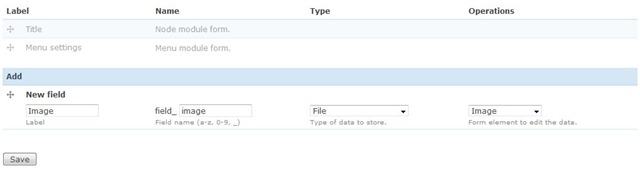
Next to the Image content type click manage fields. In the Add New field area, set the label to Image and the field name to image (to make it field_image), for the Type of data to store, select File then for Form element select Image.  Press Save.
content_type
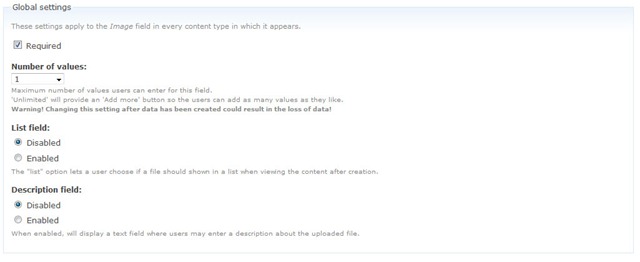
Under Global settings, tick the Required box and set the Number of values to 1.  Leave the List field and Description field to Disabled.
imagefield
Then press the Save field settings button.
Now click the Display fields tab at the top of the page.
Set the Label to Hidden and set both the Teaser and Full node to Lightbox2: thumbnail->lightbox.
imagedisplay
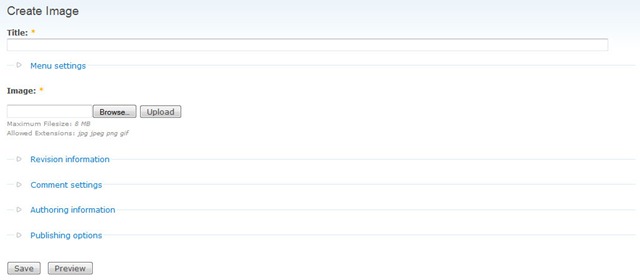
Now under /node/add/image we can add an image to go in to our gallery.
newimage
For now create 3 or 4 images.
Under /admin/content/node you should now have some nodes.
nodes
Now we will set up a view to display these nodes in a gallery.
Views
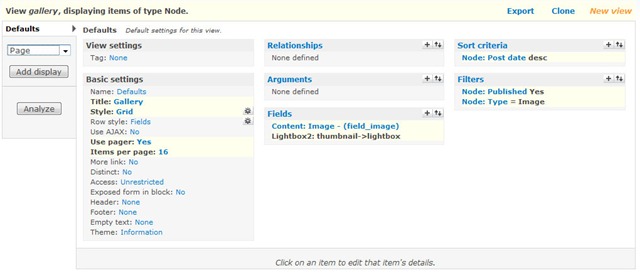
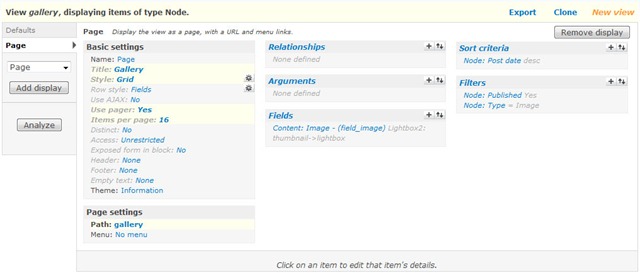
Navigate to /admin/build/views and click the Add tab at the top of the page. Set the view name to something like gallery. Leave View type set to Node.
Set the title to Gallery. For Style set to Grid then chose 4 columns and set Alignment to Horizontal.
For Use pager set to Full pager.  Then for Items per page, set to a multiple of 4, I am going to use 16 to give us a 4x4 grid of images. If you wish, you can set Use AJAX to Yes to stop the whole page being loaded on the pager.
Add the following Filters:
  • Node: Published = On
  • Node: Type = Image
Under Fields select Content: Image (field_image). Set Label to None and change Format to Lightbox2: thumbnail->lightbox.
Under Sort criteria you can set this to what you want.  I am going to set them to newest first. Select Node: Post date and set to Descending.
galleryunsaved
On the left select Page from the drop down and click Add display.
Under Path set to gallery.
viewpage
Press Save.
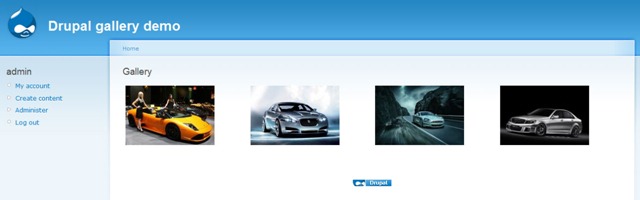
Now if you navigate to /gallery you can see your gallery in action.
gallery
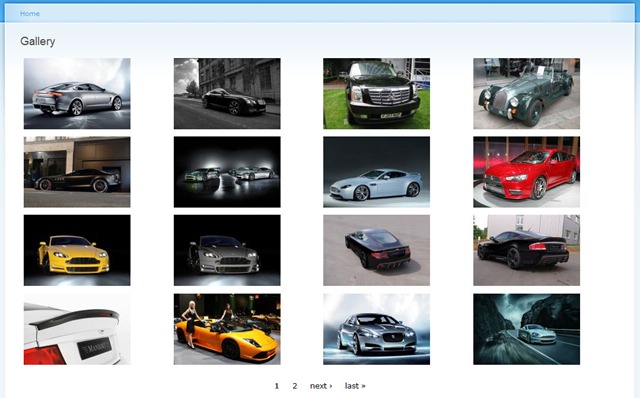
Once you upload more than 16 images which we set our Items per page to, a pager will appear.
full_gallery
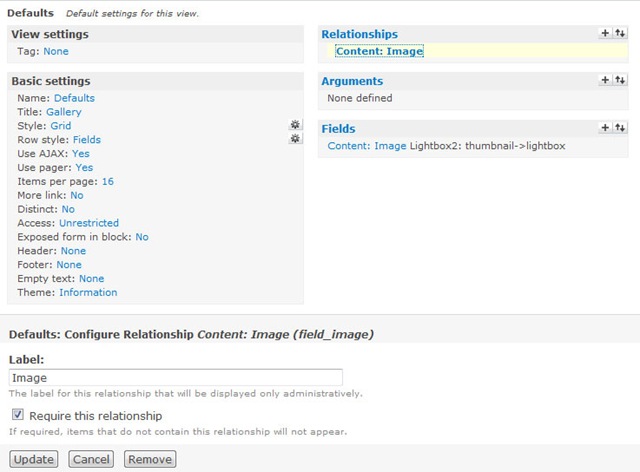
Update: There may be cases where the image isn't uploaded to the image type when a user submits the node add form without uploading the image. This will show up as an empty section within the gallery and the node will be submitted with no image, but Imagefield will not tell the user that this is a problem even if it is a required field.
To stop these empty image types showing in the gallery, you will need to add a relationship for the image and set it to a required relationship. This way the image node will not appear in the gallery unless there is an image attached. You could then set up an additional view to find out which image nodes don't have an image attached.
relationship


http://jamestombs.co.uk/2009-03-18/create-a-simple-image-gallery-in-drupal-6-using-cck-and-views/996